
DCA Bot vs Grid Bot: Which One Fits Your Market?
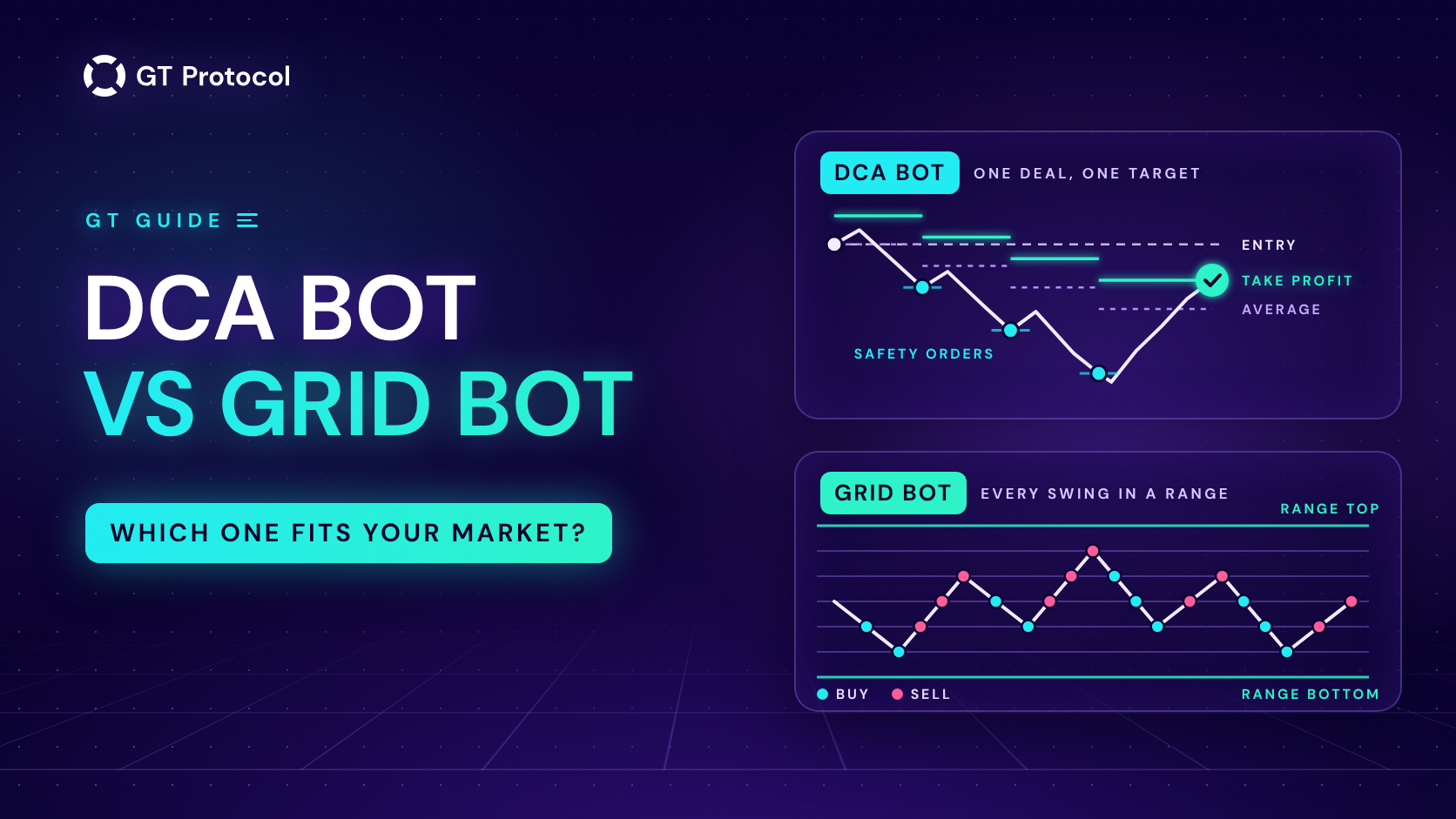
A DCA bot and a grid bot both trade on their own, but they bet on different markets. A DCA bot opens one deal, buys more if the price moves against it and closes everything at one take profit. A grid bot spreads small buy and sell orders across a price range and earns on each swing inside it.
This guide puts the two side by side: how each one works, which market suits it, where each one breaks and how to choose. The last part shows how DCA bots work in GT App, which runs DCA strategies and has no grid bot. It doesn’t tell you which coin or settings to trade.
Table of contents
- How does a DCA bot work?
- How does a grid bot work?
- What is the difference between a DCA bot and a grid bot?
- Which market suits each one?
- Where does each one break?
- How do you choose between a DCA bot and a grid bot?
- How does a DCA bot work in GT App?
- Frequently asked questions
How does a DCA bot work?
DCA stands for dollar-cost averaging. A DCA bot trades one pair in deals, one deal at a time, and every deal has the same parts:
- An entry. The deal opens with a start order when the bot’s entry rule fires: an indicator signal, a drop of a set size, or simply as soon as the previous deal is over.
- Safety orders. If the price moves against the deal, the bot buys more at steps you set in advance: below the entry on a long, above it on a short. Each fill moves the average entry price toward the market.
- A take profit. The target is measured from the average entry, and when the price reaches it, the bot closes the whole position at once: the start order and every safety order that filled.
- A stop loss, if you set one. It closes the whole deal at a loss when the price goes further against it than you are willing to accept.
After a deal closes, the bot waits for its next entry and starts again. A simple example in round numbers:
- A long deal buys 10 coins at $10.00 with a 2% take profit. The target sits at about $10.20.
- The price falls, and a safety order buys 10 more coins at $9.00. The average entry is now $9.50.
- The take profit moves down to about $9.69. A bounce to that level closes all 20 coins with about 2% on the money in the deal, even though the price never got back to $10.00.
That is the bet a DCA bot makes: the price may dip after the entry, but it will bounce at least a little before it falls through the whole ladder. Safety orders turn a dip into a better average, and they also add money to the deal right when it is going against you.
How does a grid bot work?
A grid bot works inside a range you choose: a lower price, an upper price and the number of levels between them. It places buy orders on the levels below the current price and sell orders on the levels above it. When a buy fills, the bot places a sell one level higher; when that sell fills, it places a buy one level lower. Each round trip between two neighbouring levels earns the gap between them, minus two trading fees.
Take a range from $9 to $11 split into ten steps of $0.20. A coin bought at $9.80 is sold at $10.00, and one bought at $10.00 is sold at $10.20: about 2% per round trip on that small order, before fees. If the price swings between $9.80 and $10.20 for a week, those orders fill again and again.
While the price stays inside the range, a grid bot doesn’t need to guess the direction; it needs the price to keep moving back and forth. The trouble starts when the price leaves the range:
- Above the top, a basic grid has sold everything it bought and holds only stablecoins. It stops trading, and it no longer holds the coin that is rising.
- Below the bottom, it has bought on every level on the way down and holds coins worth less than it paid. It stops trading until the price comes back, or until you close the position at a loss.
On futures, a grid can use leverage. That makes every swing worth more, and it also brings liquidation closer when the price breaks out of the range against the position.
What is the difference between a DCA bot and a grid bot?
Both bots buy low and sell higher, but they hold your money differently and earn in different markets.
| DCA bot | Grid bot | |
|---|---|---|
| Position | One deal at a time, built up in steps | Many small orders spread across a range |
| Earns on | A bounce from the average to one take profit | Each swing between two neighbouring levels |
| Money at work | The start order, plus the ladder only if the price goes against the deal | Spread across every level from the start |
| Key settings | Entry rule, safety orders, take profit, stop loss | Range bounds and the number of levels |
| Main risk | A fall deeper than the whole ladder | The price leaving the range |
| Exit | Take profit or stop loss for the whole deal | Many small exits, one per round trip |
How the money is held matters as much as the strategy. A grid divides your budget across all its levels at once, so each order and each gain is small. A DCA bot keeps most of the budget in reserve: a deal that goes well may use only the start order, and a deal that goes badly ends up holding the whole ladder.
Which market suits each one?
Neither bot is better in every market. Each one has a market it was built for and a market that hurts it.
| Market | DCA bot | Grid bot |
|---|---|---|
| Sideways range | Works if its entry catches the swings, one deal at a time | Its home ground: earns on every swing |
| Rising, with pullbacks | Buys the pullbacks and sells the bounce | Sells out early and stops earning above the range |
| Falling steadily | Fills its ladder; then the stop loss or a long wait | Keeps buying all the way down |
| Sudden spike | Hits its take profit or its stop loss | Leaves the range and needs a new one |
A grid suits a market you expect to stay between two prices you can name. A DCA bot suits a market that moves in one direction with pullbacks along the way, or swings an entry signal can catch. In a market that keeps falling, both lose money on a long position. A DCA bot can also trade short, which turns the same logic upside down.
Where does each one break?
Both bots fail in ways you can plan for, if you know them before you start.
A DCA bot breaks when the price falls further than the ladder reaches. By then the deal holds the most money it can, at an average above the market. Without a stop loss, it waits for a bounce that may take weeks; with one, it closes at a loss on the full size of the deal. Two settings make this worse fast:
- Large size multipliers. When each safety order is bigger than the one before, the last orders hold most of the money, and a ladder that looks small on paper adds up quickly.
- High leverage on futures. Leverage brings the liquidation price closer to your entry, and the stop loss has to sit before it. Cross or Isolated Margin for a Futures Bot in GT App explains how much of your balance a futures deal can draw on.
A grid bot breaks when the price leaves the range. On the way up it sells out early; on the way down it fills with coins at falling prices. Moving the range after the price means selling or buying at the new price, which locks in the result of the move. Two more traps:
- Levels too close together. Every round trip pays two trading fees, and on a narrow gap they take a large share of the gain.
- A range that is really a forecast. The bounds are a bet on where the price will stay. If that bet is wrong, the grid has nothing left to trade.
Neither bot removes risk. Each one decides how you take it: a DCA bot in bigger, less frequent deals, a grid in many small trades that depend on one range.
How do you choose between a DCA bot and a grid bot?
A few questions narrow it down before any money is at work:
- Can you name the range? If the price has respected a floor and a ceiling for a while and you expect it to stay there, a grid fits. If you can’t name them, a DCA bot doesn’t need them.
- Do you have a view on the direction? A DCA bot trades long or short and earns on bounces in that direction. A grid needs no view, but it needs the range to hold.
- How should your money be used? A grid puts the whole budget across the range from the first minute. A DCA bot keeps most of it for safety orders, so count the full ladder as the money one deal can use. How Much Money Do You Need to Start a Crypto Trading Bot? shows how a ladder adds up.
- How much do you want to watch it? A grid needs a new range after a breakout. A DCA bot needs a ladder and a stop loss that fit your budget, then it waits for its entries.
- Test before real money. Run the settings on past data, then on live prices with paper money. Backtesting vs Paper Trading explains what each test shows.
How does a DCA bot work in GT App?
GT App runs DCA strategies; it has no grid bot. Every strategy is a DCA bot on one pair: long or short, on spot or futures, on your own Binance or Hyperliquid account connected by API, so the funds stay on your exchange. Each part of a deal is a setting in the app:
- Entry. Bollinger Bands, KDJ, Dip entry or Immediate Start, or you start a deal yourself. In a choppy market, Bollinger Bands enters when the price comes back inside the bands, and Dip entry waits for a drop of the size you set from a recent high. Immediate Start opens the next deal as soon as the last one closes.
- Safety orders. How many, how far apart and how much bigger each one is. Safety Orders: How to Set Your First DCA Levels Correctly walks through the ladder.
- Take profit. Counted on the whole deal from the average entry, with trading fees built in, and moved every time a safety order fills. See How to Set Take Profit on a Trading Bot in GT App.
- Stop loss. Counted from the average entry too; with safety orders it has to sit beyond the last one. See How to Set a Stop Loss on a Trading Bot in GT App.
- Direction. Long or Short; Trend Changer and Macro Trend Changer can warn you about a turn or switch the direction. See Long or Short: Choosing a Trading Bot’s Direction in GT App.
You can test a setup before real money is at work. Create Strategy builds a futures strategy with a Bollinger Bands or KDJ entry and backtests it on past data each time you change a setting; Optimize tries other directions, take profits, stop losses and timeframes on the same history. Then launch it as a demo, which trades live prices with paper money, free and without a plan. Backtest and Launch a Futures Strategy in One Screen and How to Optimize a Crypto Trading Bot in One Click show both steps.
Frequently asked questions
Is a DCA bot better than a grid bot?
Neither is better in every market. A grid earns on swings inside a range and suffers when the price leaves it. A DCA bot earns on bounces and suffers when a fall goes deeper than its ladder. The right one is the one that matches the market you expect, tested on past data and on paper money first.
Does GT App have a grid bot?
No. GT App runs DCA strategies: one deal at a time with an entry rule, safety orders, a take profit and a stop loss.
Can a DCA bot trade a sideways market?
Yes, if its entry catches the low side of the swings, as a Bollinger Bands entry or Dip entry is meant to, and its take profit fits their size. It trades one swing per deal, where a grid trades many at once. Check it in a backtest on a sideways stretch of history first.
Is a DCA bot the same as dollar-cost averaging?
Not quite. Classic dollar-cost averaging buys a fixed amount on a schedule and holds for the long term. A DCA bot averages within one deal, adding safety orders only when the price moves against it, and closes the deal at its take profit. GT App doesn’t run scheduled purchases.
Which one needs more money?
It depends on the settings rather than the type. A grid splits its budget across all its levels, so a wide range with many levels needs a large budget for each order to be worth trading. A DCA bot needs the start order plus every safety order in its ladder.
Is this article investment advice?
No. It is published by GT Research for information. GT Protocol provides software, not financial, investment, tax or legal advice. The examples here show how the two kinds of bots work; they are not recommendations or forecasts, and every trading decision is the reader’s own.
Where to start
If you expect your market to move in one direction with pullbacks, or to swing in a way an entry signal can catch, open Create Strategy in GT App and pick a pair you know. Set the safety orders, take profit and stop loss, watch the backtest, press Optimize and read what it changed, then launch the strategy as a demo. New to the app? Four Steps from Sign-Up to Real-Money Trading in GT App shows where this fits.
This article is published by GT Research for information. It compares how DCA bots and grid bots work, and it is not financial advice. Nothing here is a prediction or a promise of returns, and the numbers in the examples are illustrations, not results or recommended settings. Backtest and demo results are simulations and do not predict how a strategy will perform with real funds. Trading digital assets, and futures in particular, carries a risk of losing some or all of the funds committed. GT Protocol provides software, not financial, investment, tax or legal advice. Binance and Hyperliquid are third-party platforms with their own terms, and GT App is not available in every jurisdiction; the Terms of Service list the restrictions.