
How to Set Take Profit on a Trading Bot in GT App
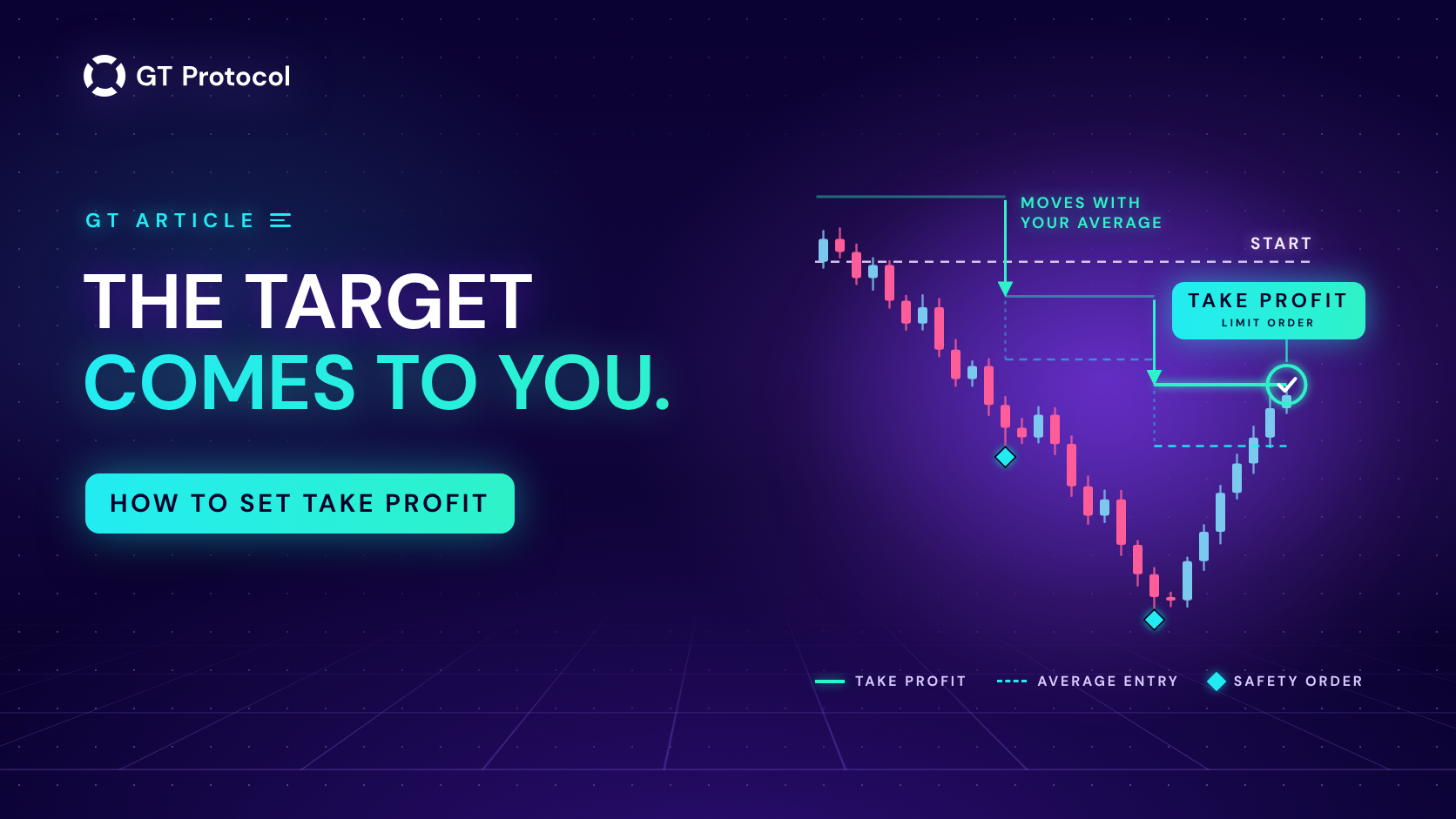
Take profit is the target at which a GT App strategy closes a deal and books the gain. You set it as a percentage. The app counts it on all the money in the deal from your average entry price, builds trading fees into the target and moves it with your average every time a safety order fills.
This guide shows where to set take profit, how it works with safety orders, leverage and trailing, and how to test a value before real money is at work. It describes the app as of October 2026 and doesn’t tell you which coin or settings to trade.
Table of contents
- What is take profit in a GT App strategy?
- Where do you set take profit in GT App?
- How does take profit move when safety orders fill?
- What does take profit mean on futures with leverage?
- When should you use trailing take profit?
- How do you choose a take profit?
- What else can close a deal?
- How do you know the take profit was hit?
- Frequently asked questions
What is take profit in a GT App strategy?
A GT App strategy trades in deals. A deal opens with a start order, can add safety orders if the price moves against it, and ends at a take profit or a stop loss. Then the strategy looks for its next entry. Every strategy has a take profit: it is the exit the deal is built around.
On the strategy builder the field is called Take Profit (%), and its hint reads “Price move that closes the deal in profit.” In the full strategy form it is Take profit (%): “How much profit your strategy should make from each deal.” Three things decide where the target actually sits:
- It is counted on the whole deal. The percentage applies to everything the deal holds, the start order plus every safety order that has filled, and it is measured from the average entry price.
- Fees are already in it. The app adds the exchange’s trading fees for getting in and out to the target price, so a 1% take profit means about 1% left after those fees, not 1% before them. Deal details on the strategy screen show the zero profit price, the break-even after fees; your target sits above it by your percentage on a long and below it on a short.
- It waits on the exchange. Unless trailing is on, the strategy places the take profit as a limit order on your exchange account as soon as the start order fills. It can fill the moment the price gets there, whether or not the app is open on your screen.
Where do you set take profit in GT App?
You choose the take profit when you create a strategy, and you can change it later, including in the middle of a deal.
| Where | What you can do |
|---|---|
| Create Strategy | Set Take Profit (%) and watch the backtest redraw within a second; press Optimize to let the app try levels for you |
| Full strategy form | Set Take profit (%), plus Trailing Take Profit and Trailing deviation (%) where the exchange allows trailing |
| Strategy screen, open deal | Type a new percentage in Strategy settings, or drag the take profit line on the chart to a price |
| Portfolio | Set Take Profit (%) for each coin separately |
The full form opens from Create Spot Strategy on My Strategies and from Advanced settings in the builder, and the same fields sit in the Strategy settings block on the screen of every strategy. The builder, its backtest and Optimize are explained in Backtest and Launch a Futures Strategy in One Screen.
How does take profit move when safety orders fill?
Safety orders are extra orders the strategy places in steps against the deal: below the entry on a long, above it on a short. When one fills, the deal holds more coins at a better average price, and the strategy cancels the take profit and places it again for the new average and the bigger position. The app’s own tooltip puts it in one line: safety orders bring your take profit target closer to the current price.
A simple example in round numbers:
- A long deal buys 10 coins at $10.00 with a 2% take profit. With fees added, the target sits just above $10.20.
- The price falls, and a safety order buys 10 more coins at $9.00. The average entry is now $9.50.
- The take profit is placed again just above $9.69. The price no longer has to return to $10.00: a bounce to about $9.70 closes the whole deal with 2% on both orders.
The same happens when you add a safety order by hand with + Add Manual Safety once the automatic ones are used up: the take profit is placed again for the new average.
This is the strength of the safety-order approach, and also where its risk lives. A deal that has used its safety orders holds much more money than the start order alone, and if the price keeps going past the last one, there is nothing left to average with. The size of the ladder and the stop loss are what keep that deal within your budget. Safety Orders: How to Set Your First DCA Levels Correctly covers the ladder.
What does take profit mean on futures with leverage?
On futures, the percentage is a move in the price from your average entry, not a return on your margin. Leverage changes what that move is worth, not how far the price has to travel.
Take a 1% take profit at 5x leverage. The deal closes when the price has moved 1% in your direction plus fees, and that move is worth about 5% of the margin the deal uses. At 10x, the same 1% move is worth about 10% of the margin.
Leverage multiplies a move against you in exactly the same way, and it brings the liquidation price closer to your entry. So set the take profit for the move you expect the price to make, and set the leverage for the risk you are prepared to carry. Cross or Isolated Margin for a Futures Bot in GT App explains how much of your balance a futures deal can draw on.
When should you use trailing take profit?
Trailing take profit lets a deal stay open after the price reaches your target, while the price keeps moving your way. Once it turns and pulls back by the Trailing deviation (%) you set, counted from the best price reached, the strategy closes the deal. On a strong move, that can close the deal well past the target instead of at it.
- The deviation must be smaller than the take profit. The form won’t save it otherwise (“Must be less than take profit amount.”). The smaller the deviation compared with the target, the more of the target a quick pullback leaves you.
- The exit is a market order. Without trailing, the take profit is a limit order already waiting on the exchange. With trailing, the app watches the price and sends a market order when the pullback comes, so in a fast market the fill can land a little worse than the trailing price. With very small targets that gap matters more; Trailing take-profit and deviation in our knowledge base covers the setting.
- Where it works. Trailing is available for spot strategies on Binance and Hyperliquid and for futures on Hyperliquid. On Binance Futures the form doesn’t show it. In the builder it is a single switch, shown for Hyperliquid.
Trailing suits a market that tends to keep going once it moves. In a choppy range, where the price often turns right after it touches the target, trailing gives part of the target back, while a plain take profit exits where you aimed.
How do you choose a take profit?
There is no right number for every strategy. The target is a trade-off between how often deals close and how much each one adds, and it works together with the entry, the coin and the safety orders.
| Closer target | Further target | |
|---|---|---|
| Deals close | More often | Less often |
| Each closed deal adds | Less | More |
| A deal stays open | Shorter | Longer |
| Time for the price to turn against you | Less | More |
A few habits make the choice less of a guess:
- Match it to the pace of your entry. A signal on 3-minute candles reacts to small swings; one on 4-hour candles reacts to much larger moves. A target far beyond the swings your entry trades can leave deals open for a long time.
- Match it to the coin. A volatile coin covers the same percentage more often than BTC does. A target that suits one market can be too tight or too far for another.
- Choose it together with the safety orders. The ladder decides how much money a deal can take on; the take profit decides how much of a bounce it needs to close. Change one, and look at the other.
- Test it, don’t guess. In Create Strategy, try two or three values and compare the number of trades, the win rate and the average per trade. Or press Optimize: it tries take-profit levels together with the stop loss, the direction and the timeframe, applies the strongest version on your history and keeps your capital, leverage and orders as they are. How to Optimize a Crypto Trading Bot in One Click shows how.
- Watch it in Demo first. A backtest shows what worked on prices that already happened. A demo strategy trades live prices with paper money, free and without a plan. Backtesting vs Paper Trading explains why both tests matter.
One more thing a small target does not do: make a strategy safe. Safety orders let a deal close at its target even after the price has gone against it, but the risk sits in the deal that doesn’t come back. Judge a setup by its worst open deal and its stop loss as well as by its win rate; How to Read a Backtest Report lists what to look at.
What else can close a deal?
Take profit is the exit a deal is planned around, but not the only one.
| Exit | What closes the deal |
|---|---|
| Take profit | The price reaches the target, and the limit order on the exchange fills |
| Trailing take profit | The price reaches the target, then pulls back by your deviation |
| Smart Exit | Near the target, signs of a reversal appear; needs Telegram linked |
| Stop loss | The price moves against the deal by your stop-loss percentage |
| Close Deal | You press the button on the strategy screen |
Smart Exit is an optional switch on the strategy screen: when a deal is close to its take profit and the market starts to turn, it closes the deal early instead of waiting. It never closes a deal that is in a loss. The stop loss works the other way round; with safety orders it has to sit deeper than the last one, and Stop Loss in our knowledge base explains the setting. When a deal ends at the take profit, the strategy keeps running and looks for its next entry.
How do you know the take profit was hit?
- In Telegram. With @gt_agentbot linked, “Take profit order was executed” arrives for every deal, even with Send All notifications switched off, followed by the deal’s result. Telegram Notifications in GT App lists what else arrives.
- On the strategy screen. While a deal is open, Deal status shows the take profit on the price bar, and Deal details list the take profit price next to the zero profit price. The strategy’s trading log records the moment it fills.
- In Deals History. The finished deal moves to Deal history with the status COMPLETED, and its list of orders includes a TAKE PROFIT order.
To move the target of a deal that is already open, see How to Manage an Active Deal in GT App.
Frequently asked questions
Is take profit in GT App counted before or after fees?
After. The app builds the exchange’s trading fees for entry and exit into the target price, so the percentage you set is about what the deal keeps once those fees are paid. The zero profit price in Deal details is your break-even with fees included.
What happens to my take profit when a safety order fills?
It moves. The strategy places the take profit again from the new average entry and for the bigger position, so the target comes closer to the current price. The percentage stays the same.
Can I change the take profit while a deal is open?
Yes. A new percentage saved in Strategy settings applies to the open deal straight away, and the app confirms it with “New Take profit setting applied to the current deal.” Other changes, such as safety orders, wait for the next deal.
Can I set the take profit as a price instead of a percentage?
For an open deal, yes: drag the take profit line on the chart to the price you want. The form switches to Specific price for that deal, and when the deal ends the strategy goes back to its percentage. On a long the line has to stay above the current price, on a short below it.
Why don’t I see Trailing Take Profit?
On Binance Futures the strategy form doesn’t offer trailing. It is available for spot strategies on Binance and Hyperliquid and for futures on Hyperliquid; in the builder the switch appears only for Hyperliquid.
Can I change the take profit of a copied strategy?
No. A copy of a TOP Traders strategy follows its author’s settings, which stay hidden and update with the author’s. To choose your own take profit, create your own strategy.
Is this article investment advice?
No. It is published by GT Research for information. GT Protocol provides software, not financial, investment, tax or legal advice. The examples here show how the setting works; they are not recommendations or forecasts, and every trading decision is the reader’s own.
Where to start
Open Create Strategy in GT App, pick a pair you know and move the Take Profit (%) slider a few times while you watch the backtest change. Press Optimize to see which levels held up on that history, then press Run Demo and watch the strategy reach its targets on live prices with paper money. If you are new to the app, Four Steps from Sign-Up to Real-Money Trading in GT App shows where this fits.
This article is published by GT Research for information. It describes how take profit works in GT App, and it is not financial advice. Nothing here is a prediction or a promise of returns, and the numbers in the examples are illustrations, not results. Backtest and demo results are simulations and do not predict how a strategy will perform with real funds. Trading digital assets, and futures in particular, carries a risk of losing some or all of the funds committed. GT Protocol provides software, not financial, investment, tax or legal advice. Binance and Hyperliquid are third-party platforms with their own terms, and GT App is not available in every jurisdiction; the Terms of Service list the restrictions.